 Hermod Mail
Email for iPhone and iPad
Hermod Mail
Privacy-first email
A dark-themed, privacy-first mail client for iPhone. Mail stays on your device. Tokens live in the iOS Keychain. There is no Hermod mail server.
 Free to download.
Optional Hermod Pro.
Requires iOS 17 or later.
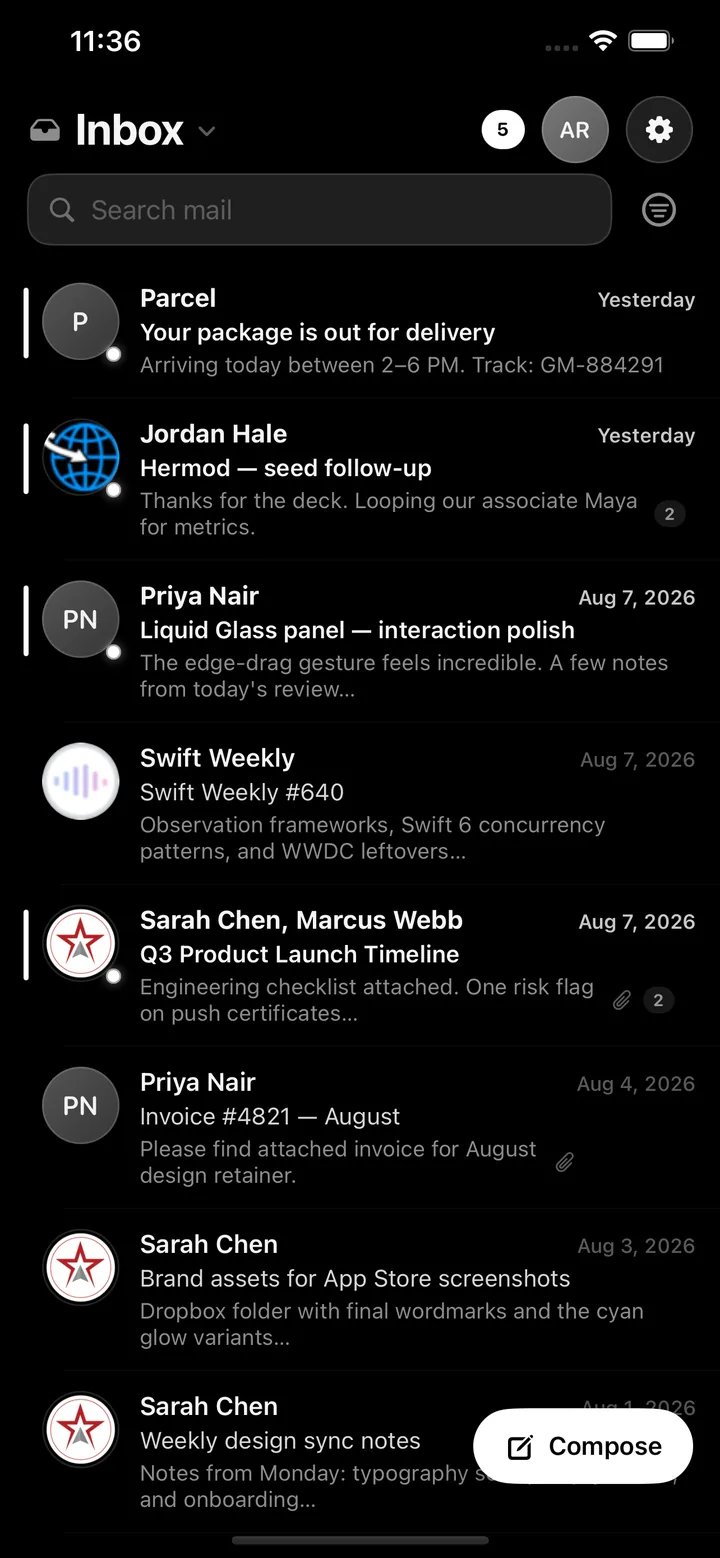
Everything you need from a mail app. Nothing you didn’t ask for.
Hermod Mail connects straight to your mail providers from your iPhone, so it stays fast, focused and private.
All your inboxes
Sign in with Google or Microsoft on their own pages, or connect Yahoo and AOL with an app password. iCloud and any IMAP mailbox work too.
On your device
Mail is cached privately on your iPhone and works offline. Sign-in tokens and app passwords live in the iOS Keychain and are never sent to us.
Privacy-first
No Hermod mail server, no ads, no third-party analytics SDKs, and no mail content sent to AI services. Your mail travels between your device and your provider.
One-tap unsubscribe
Hermod finds the sender’s own unsubscribe option. Tap Unsubscribe and it sends the one-click request or the unsubscribe email for you. Nothing happens until you tap.
Custom folders and rules
Create your own folders, move threads with a tap, and auto-file mail from a sender or with the same subject. Folder chips keep unread counts in view.
Sender intelligence
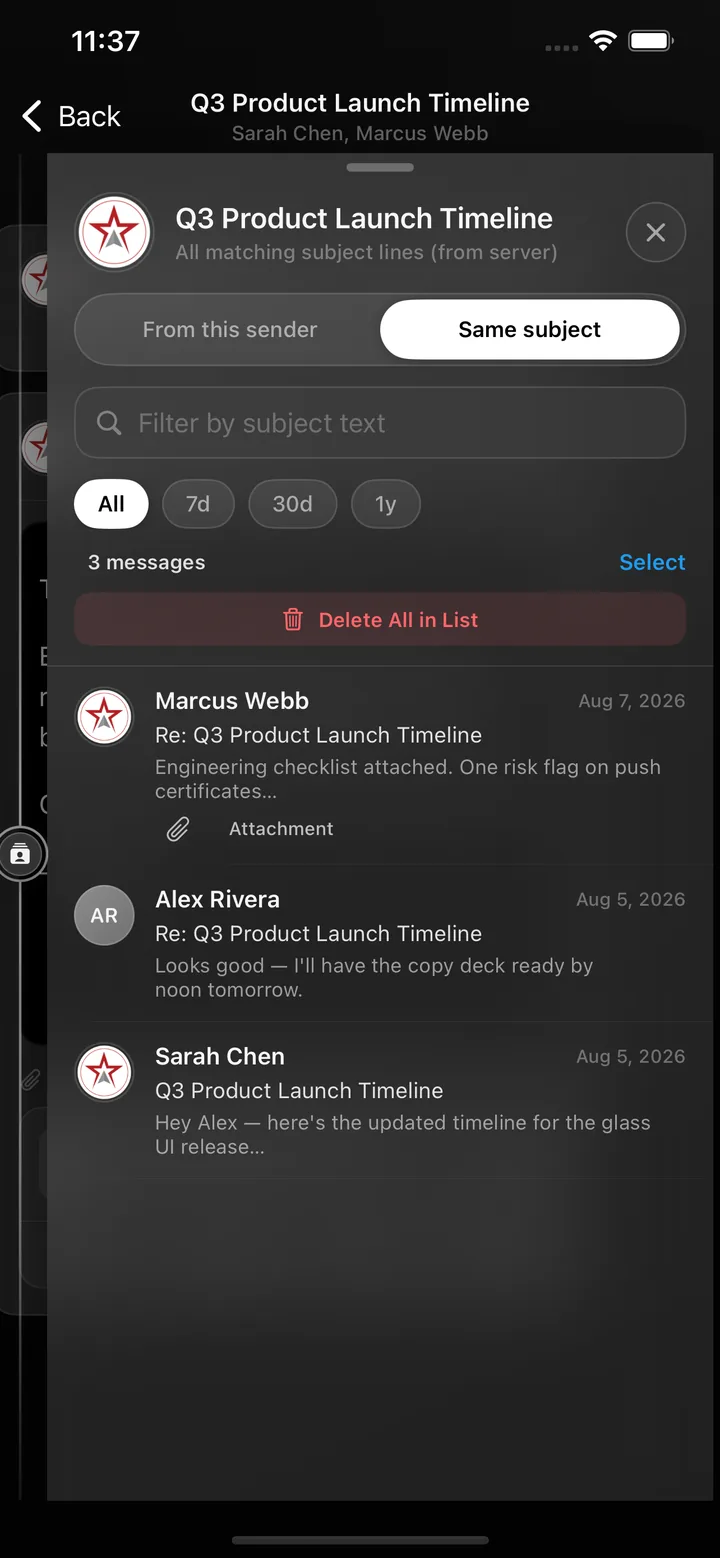
Drag from the right edge of any conversation to see every email from that person, or every message with the same subject. Clean up in bulk when you choose.
Home Screen widgets
With Hermod Pro, the Hermod Activity widget comes in small, medium and large. It shows your score, deletes, sends, opens, archives and reading time, all counted on your device.
Sender logos, your call
Show sender logos is opt-in and off by default. Leave it off and no sender domains or addresses go to logo services. Turn it on any time in Settings.
Your data, your exit
Export your data with Pro, remove a single account, or use Delete Account & Data to wipe every account, cached message and token from the device.
Built for one hand, at night or in daylight
A quick tour of Hermod Mail on iPhone.


Gmail and your Google data
Hermod Mail connects to Gmail with Google sign-in and talks to the Gmail API directly from your device to show, search, send, label, archive, and trash your mail. Hermod never receives your Gmail data, and the app sends no mail content to AI services. Read the Google user data section of the Privacy Policy, and revoke access any time at myaccount.google.com/permissions.
Hermod Mail’s use and transfer to any other app of information received from Google APIs will adhere to the Google API Services User Data Policy, including the Limited Use requirements.
- No Hermod server. Mail goes directly between your device and Google, Microsoft, Yahoo, AOL, iCloud or your IMAP host.
- Keychain only. OAuth tokens and app passwords stay in the iOS Keychain.
- No ad, analytics or crash SDKs from other companies, and no push-notification server. New-mail alerts are created on your device.
- Never sold, never used for AI training. We do not sell mail data or use it for advertising or model training.
Full details: Privacy Policy · Terms of Use
Free to start. Pro when you need more.
Hermod Mail is free to download. Hermod Pro is an optional auto-renewing subscription through Apple. Start with 2 weeks free, then $7.99/month or $49.99/year. Cancel anytime in your Apple ID settings.
Free
- 1 linked account
- 10 sends per month
- 3 Intelligence Panel peeks per month
- Inbox, search and folders
Hermod Pro Monthly
- 2 weeks free for new subscribers, then $7.99/month
- Unlimited linked accounts
- Unlimited sending
- Unlimited Intelligence Panel
- Attachments in and out
- Hermod Activity widget and activity stats
- Export your data
Hermod Pro Yearly
- 2 weeks free for new subscribers, then $49.99/year
- Everything in Pro Monthly
- About $4.17 a month, billed yearly
- Cancel anytime in Settings → your name → Subscriptions
Prices shown in US dollars. Local prices vary by country and region, and the App Store shows the exact price in your currency before you buy. The 2-week free trial is for new subscribers only; the App Store shows whether you’re eligible before you confirm. When the trial ends, the subscription renews automatically at the regular price unless you cancel at least 24 hours before the trial ends, and any unused portion of the free trial is forfeited when you purchase a subscription. Payment is charged to your Apple ID at confirmation of purchase, or when the trial ends. Subscriptions renew automatically unless you cancel at least 24 hours before the end of the current period. See the Terms of Use.
Questions
Can Hermod read my email?
No. There is no Hermod mail server. The app connects from your iPhone directly to your mail provider, and messages are cached only in the app’s private storage on your device. We keep no copy of your mail.
Which email accounts work?
Gmail (Google sign-in), Outlook and Microsoft accounts (Microsoft sign-in), Yahoo and AOL (with an app password from your provider’s security page), iCloud, and any IMAP/SMTP mailbox.
Where are my passwords and tokens stored?
In the iOS Keychain on your device. Google and Microsoft sign-in happen on the provider’s own page, so Hermod never sees those passwords.
What do sender logos do, and why are they off?
When you turn on Settings → Show sender logos, the app looks up a logo for the sender’s domain (and a Gravatar hash of the address) from DuckDuckGo, Google’s favicon service, the sender’s own website, and Gravatar. It’s off by default, so no sender information goes to those services unless you choose it. Details are in the Privacy Policy.
How does unsubscribe work?
If a message includes the sender’s unsubscribe option, Hermod shows an Unsubscribe button. When you tap it, the app sends the sender’s one-click request to their web address, or sends an unsubscribe email from your account. Nothing is sent until you tap.
What do I get with Hermod Pro?
Unlimited linked accounts and sending, an unlimited Intelligence Panel, attachments in and out, the Hermod Activity widget and activity stats, and data export. Start with 2 weeks free, then $7.99/month or $49.99/year in the US. Cancel anytime in your Apple ID settings. Local prices vary.
Is there a free trial?
Yes. New subscribers get 2 weeks of Hermod Pro free, then $7.99/month or $49.99/year in the US (local prices vary). Cancel anytime in your Apple ID settings at least 24 hours before the trial ends and you won’t be charged. The trial is for new subscribers only, and the App Store shows whether you’re eligible before you confirm.
How do I cancel or restore a subscription?
Cancel anytime in iPhone Settings → your name → Subscriptions. To restore on a new device, open Hermod Pro in the app and tap Restore Purchases.
How do I delete my data or revoke Google access?
In Settings, swipe left on an account and tap Remove, or use Delete Account & Data to erase every account, cached message and token from your device. You can also revoke Google access at myaccount.google.com/permissions.
Does it work on iPad?
Yes. Hermod Mail runs on iPhone and iPad and requires iOS 17 or iPadOS 17 or later.
How do I get help?
Email support@tryhermod.com or visit the Support page.
Your mail. Your device.
Get Hermod Mail for iPhone and iPad.